
SOAP API login() Breaks on 1 December: Find Every User It Hits in 5 Minutes
Salesforce is retiring SOAP API login() in Summer '27, but the first break comes on 1 December 2026. Here are the four dates, the query that shows who is affected, and a step-by-step plan to fix it.
Most of what has been written about SOAP API login() talks about Summer '27, when it is retired for good. That date feels far away. It is not the one that will catch you.
On 1 December 2026, any user who logs in through SOAP login() without a new permission gets refused. Two more changes follow in December and January. If you have an integration user, a middleware account, or a colleague who still runs an Excel connector or an old data loader, this applies to you.
The good news: finding out takes one query and about five minutes. Fixing it for 1 December takes a permission set. The real work, moving to OAuth, can then be planned properly instead of rushed.
What SOAP login() is, and why it is going
SOAP login() is the oldest way to sign in to the Salesforce API. A tool sends a username, a password and usually a security token, and gets back a session it can use for any API call.
It works, which is why so much still depends on it. But it has three problems that Salesforce has been closing off for years:
- There is no app behind it. The login is tied to a user, not to a named integration, so you cannot see which tool made it, limit what it can do, or switch it off on its own.
- It needs a stored password. Somewhere, in a middleware config or a script or a spreadsheet macro, someone's Salesforce password is sitting in plain sight.
- It skips the controls OAuth gives you, such as scopes, refresh-token policies and per-app IP rules.
OAuth through a connected app or an External Client App fixes all three. That is where Salesforce wants every integration to end up.
The four dates
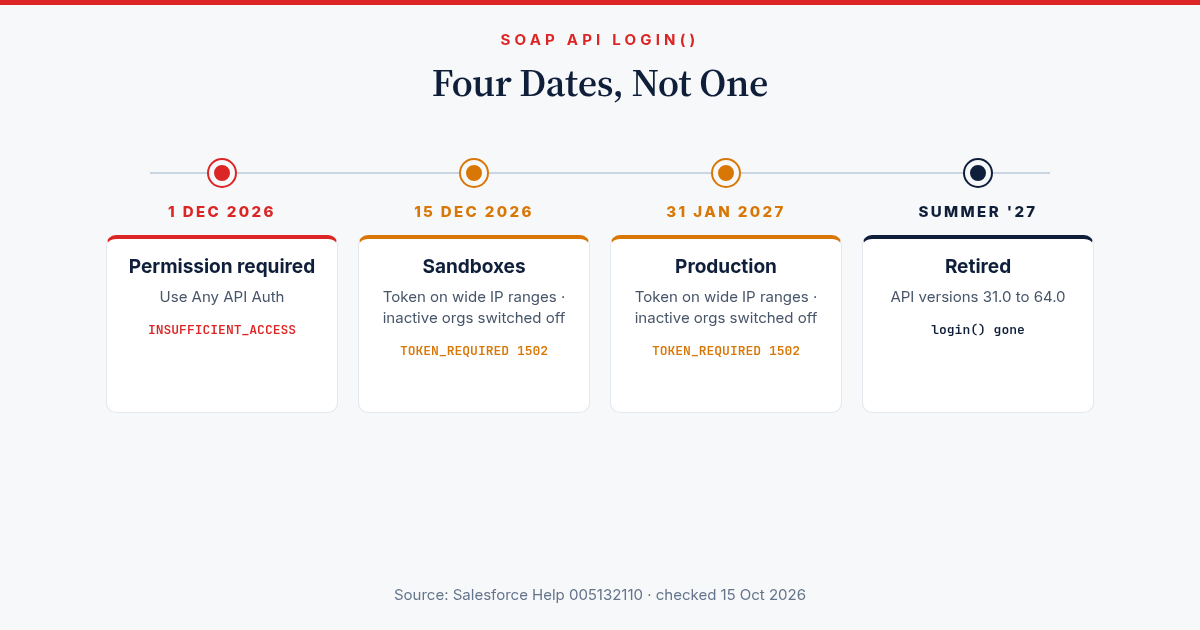
| Date | What changes | What you see if you miss it |
|---|---|---|
| 1 Dec 2026 | SOAP login() needs the Use Any API Auth permission | INSUFFICIENT_ACCESS on login |
| 15 Dec 2026 (sandbox) / 31 Jan 2027 (production) | A security token is required when the user's login IP range is wider than /8 (IPv4) or /29 (IPv6) | TOKEN_REQUIRED (1502) |
| 15 Dec 2026 (sandbox) / 31 Jan 2027 (production) | SOAP login() is switched off in orgs with no SOAP login() calls in the previous 6 months | Login fails, with no warning |
| Summer '27 | SOAP login() retired in API versions 31.0 to 64.0 | Login fails for good |
Two details matter here. SOAP login() is already unavailable in API 65.0 and later. And in orgs created from Winter '26 onwards, it is off by default.
Some posts say the permission is needed from the Winter '27 upgrade. Salesforce's own Help article (005132110) gives 1 December 2026. That is the date to plan around.
Am I affected? Three ways to check
1. Login History in Setup (no code)
In Setup, open Login History. Create a view, or download the last six months as a CSV, and filter on the Login Subtype column for "SOAP API". Sort by username. This is enough for a small org.
2. One SOQL query (the five-minute version)
For a bigger org, group the logins instead of reading them. Run this in the Developer Console, Workbench or the CLI:
SELECT UserId, LoginType, ApiType, Application, COUNT(Id) logins, MAX(LoginTime) lastSeen
FROM LoginHistory
WHERE LoginTime = LAST_N_DAYS:180
  AND LoginType IN ('Other Apex API', 'Partner Product')
GROUP BY UserId, LoginType, ApiType, Application
ORDER BY COUNT(Id) DESC
You cannot filter on ApiType in a query, which is why it is grouped instead. Look for rows where ApiType is SOAP Partner or SOAP Enterprise.
Then look up the users by Id:
SELECT Id, Username, Profile.Name, IsActive, LastLoginDate
FROM User
WHERE Id IN ('005...', '005...')
On a busy org, the 180-day query can be slow. Drop it to LAST_N_DAYS:30 first if it times out, then widen it.
3. Event Monitoring (if you have it)
The API Total Usage event log shows every API call, not only logins. Filter on API_FAMILY = SOAP, API_RESOURCE = login and an empty CONNECTED_APP_ID. An empty connected app is the signal that nobody set up OAuth for that integration.
How to read the result
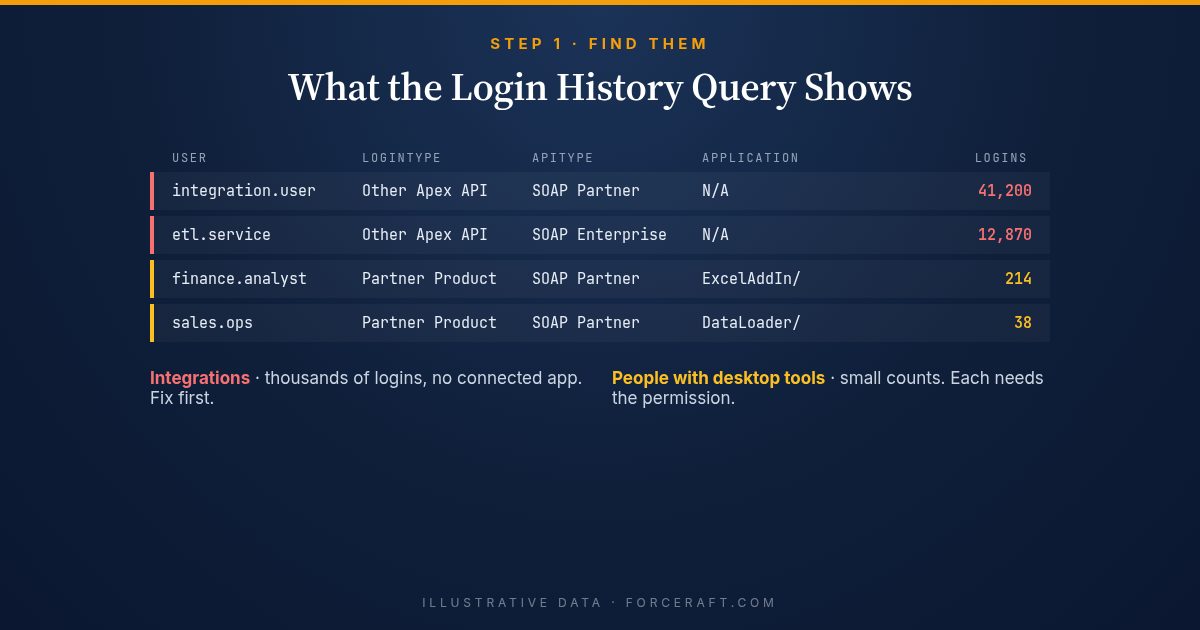
The rows usually fall into two groups.
Integration users with thousands of logins and a recent lastSeen. These are middleware platforms, ETL tools and custom scripts that log in with a username and password over SOAP. Login Type shows as "Other Apex API" and the Application as "N/A". These are the ones that will stop on 1 December, and they will usually stop at night when nobody is watching.
Real people with a handful of logins under "Partner Product". The Application column names the tool: an Excel add-in, a desktop data loader, an older reporting connector. Each of these people needs the permission too, or their tool stops working.
Find an owner for every row
A list of usernames is not a plan. For each integration user, write down three things:
- What system logs in as it. The username, the profile name and the login IP addresses usually give it away. If they don't, ask whoever runs your middleware.
- Who owns that system. That person has to test the change and, later, the move to OAuth.
- How often it runs. A job that runs once a quarter is the one most likely to fail quietly, because nobody will notice until the next run.
The integration users with the most logins come first. They do the most work, so a failure costs the most.
What to do this month
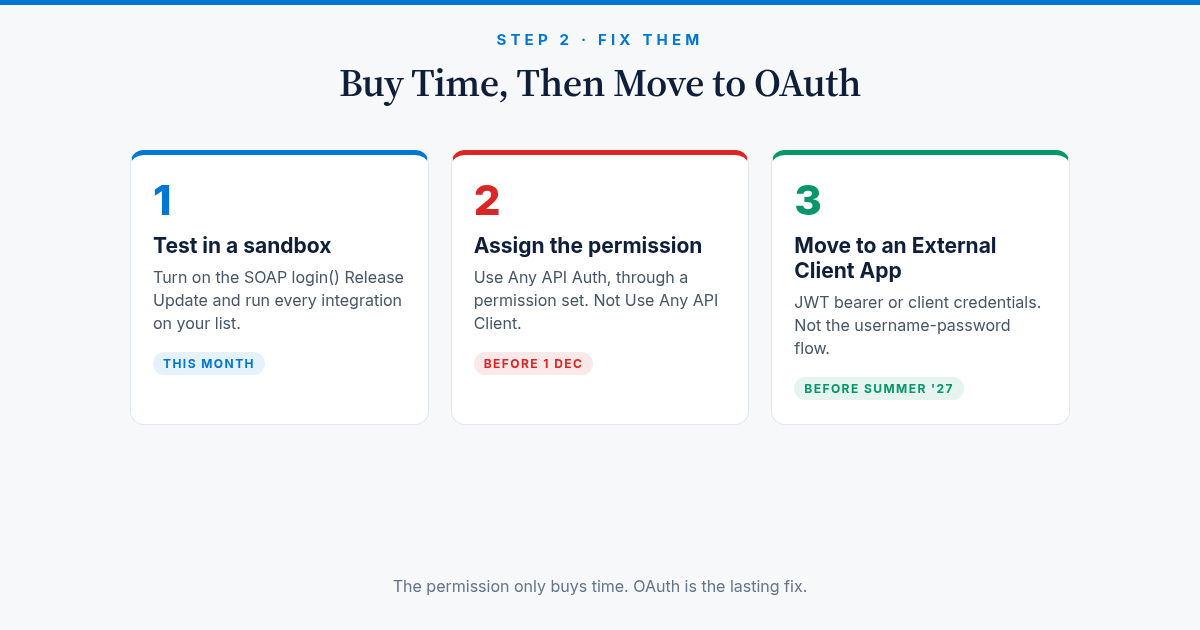
1. Test the permission in a sandbox. In Setup, open Release Updates and find the SOAP API login() update. Turn it on in a sandbox, then run every integration on your list. Anything that fails with INSUFFICIENT_ACCESS needs the permission.
2. Give "Use Any API Auth" to the users on your list. Create a permission set, for example "SOAP login() temporary access", and turn on Use Any API Auth in its system permissions. Assign it to each user from your query. A permission set is better than editing profiles: you can see exactly who has it, and when an integration moves to OAuth you take it away from that one user. Assign it in production well before 1 December, not on the day.
3. Check the IP ranges on those users' profiles. On each integration user's profile, look at Login IP Ranges. If it allows a very wide range, such as everything, the integration will need a security token from 31 January. A token is the quick fix. Narrowing the range to your middleware's real addresses is the better one, because it also stops anyone else using that login.
4. Plan the move to OAuth. The permission only buys time until Summer '27. The lasting fix is an External Client App with one of two flows:
- JWT bearer flow. The integration signs a token with a certificate and acts as a named user. No password is stored anywhere. This suits middleware that runs as an integration user.
- Client credentials flow. The integration uses a client id and secret, and Salesforce runs it as an execution user you set on the app. This suits server-to-server jobs with no person behind them.
Most middleware and ETL platforms support at least one of the two. Start with the integration that has the most logins.
Questions to ask your vendors
If a third party runs the integration, send them these questions now:
- Does your connector use SOAP login() today, or OAuth?
- Does it support the JWT bearer or client credentials flow?
- Which version of your connector do we need to switch, and is there downtime?
- Will you test it in our sandbox before we change production?
A vendor that can only offer username-password OAuth has not solved the problem. See the next section.
Three traps
"Use Any API Auth" is not "Use Any API Client". The names are close and they do different jobs. The first one lets a user call SOAP login(). Assigning the second one does nothing for this change.
The OAuth username-password flow is not the fix. It is also being retired, on 20 February 2027. If a vendor offers to "switch you to OAuth" using a username and password, you will be doing this work twice.
Quiet orgs get switched off without notice. If you have a sandbox or a small org where an integration runs once a quarter, it may show no SOAP login() calls in the last six months. On 15 December (sandbox) or 31 January (production), SOAP login() is turned off there, and the quarterly job fails on its next run.
Common questions
Does this affect the REST API? Not directly. The change is about how a tool signs in, not which API it calls next. A tool that gets its session from SOAP login() and then calls REST or Bulk API is still affected.
Does Data Loader break? Data Loader set to sign in with a username and password uses SOAP login(), so that user needs the permission. Data Loader signing in through OAuth in the browser does not use SOAP login().
We only use OAuth. Can we ignore this? Run the query anyway. Most orgs that say they only use OAuth find at least one forgotten script or desktop tool.
Can we just give everyone the permission? You can, but you lose the list that tells you what still needs to move to OAuth. Give it only to the users the query found.
Also in Salesforce's October update
Two smaller items are worth a look if you run an Experience Cloud site:
- Guest user personal information. A Winter '27 release update, "Conceal Personal Information Fields from Guest Users", masks most User fields from unauthenticated visitors. It becomes mandatory in Spring '27. Test it now, then unmask only the fields your site really needs.
- Guest access to the GraphQL API now has its own setting under API Access Controls. It is off by default unless your site has used it since March 2026.
The checklist
- Run the Login History query and list every SOAP login() user.
- Name an owner and a run frequency for each integration user.
- Turn on the Release Update in a sandbox and test each integration.
- Assign "Use Any API Auth" through a permission set before 1 December 2026.
- Check profile IP ranges before 31 January 2027.
- Ask your vendors about JWT bearer or client credentials support.
- Move each integration to an External Client App before Summer '27, and remove the permission as each one moves.
Last verified 15 October 2026 against Salesforce Help article 005132110 and the Winter '27 release notes. Salesforce has moved these dates before, so I will update this post if they change.
Integration clean-ups like this are a big part of what I do: finding what logs into your org, moving it to OAuth, and proving it works before the deadline. See my services or get in touch.